跳到正文
Chance OS
菜单

产品

技术员门户

Technician Portal

问题

工做完了,照片却留在技术员的手机里,过了几天才凭记忆补写报告。

原理

专为地下机房而设计:系统会压缩照片、重试上传,哪张没传上去也会如实告诉你。

谁在用

技术员用 PIN 登录,在办公室开启的时段内完成设定。不用邮箱,不用到应用商店下载,也不用担心人在屋顶上却忘了登录密码。

办公室开启设定时段,也可以重置 PIN。PIN 由技术员在自己的手机上设定 — 但一定要在办公室开启的时段内。

流程

Chance OS 的闭环工单 → 派工中心 → 技术员门户 → 收入入账 → 小组盈亏 → 利润池 → 工单1工单Job2派工中心Dispatch Center3技术员门户Technician Portal4收入入账Revenue Recorded5小组盈亏P&L6利润池Profit Pool

产品画面

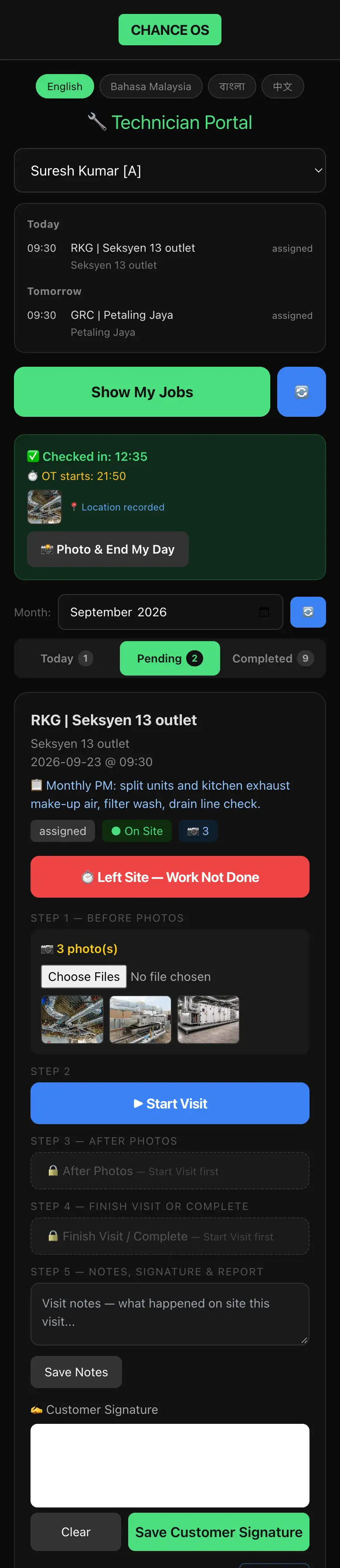
Technician Portal on a phone: a language switcher, the technician's name, today's visit at 09:30 and tomorrow's, the day's check-in at 12:35 with an overtime start time and a recorded location, then the visit itself — customer, date and time, the work to be done, an On Site marker, three before-photos of plant-room ductwork and air handling units — and the steps that stay locked until the visit starts: after-photos, finish, notes, customer signature and report.

上门记录不会一直处于未结束的状态。卡住的作业会按规则关闭,不用等人发现。

客户签名和签字报告按每一次上门保存。

你的上班时间,你的加班规则 — 签到后自动起算加班 (OT)。

结果

每次上门都有施工前照片、施工后照片、客户签名,以及带有你公司抬头和报告编号的服务报告。

目前还做不到的

技术员门户(Technician Portal)不会先把工作记录存在手机上,等之后再上传。每一次保存都需要有信号。

WhatsApp 联系我们预约演示